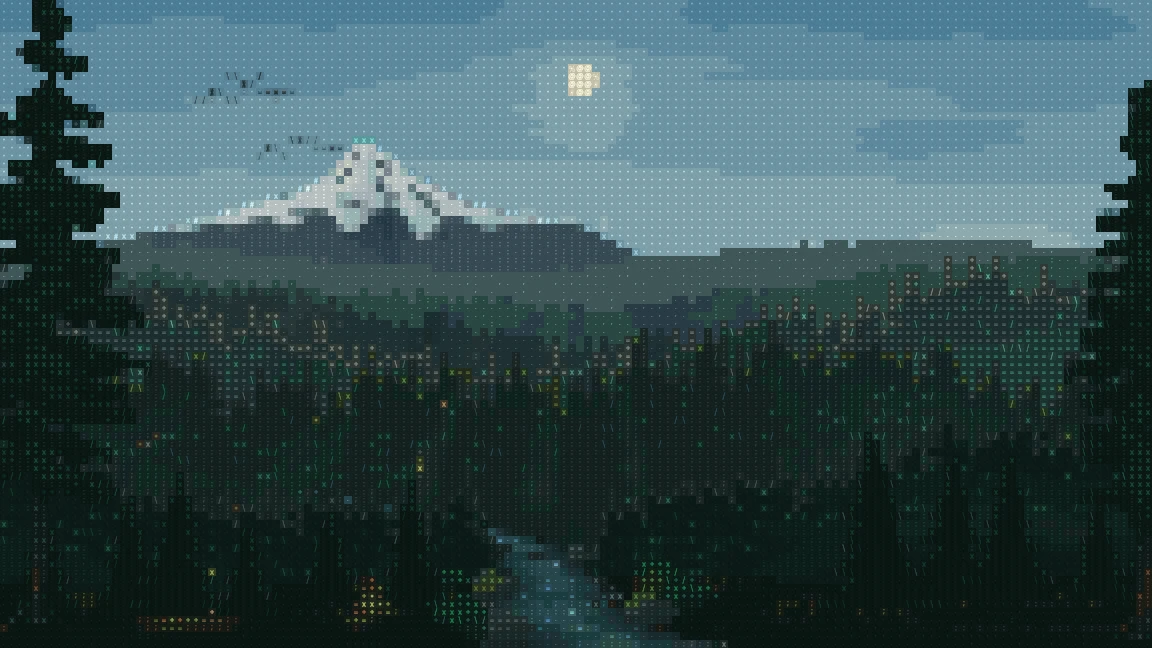
The landscape on my homepage is built from a grid of colored characters. Mount Hood, the trees, and the stream are calculated shapes; clouds, light, and water change around them. It is a small 2D renderer that happens to draw with text.
The starting point was the MIT-licensed misty forest from ascii.rest, by bas3line. I adapted that foundation to this site, then added the mountain and creek work, Portland's sky and weather, responsive composition, and the rendering and loading pipeline. Here is how those pieces fit together.
The examples below use the same forest generator and glyph renderer as the homepage. They render on demand, with a fixed motion frame so you can compare changes. Weather values are illustrative presets; the demos do not fetch a forecast or change the homepage.
A picture made of character cells
Each cell carries more than a character. The generator writes a glyph, a palette index, a background tone, and an emitted-light value. The renderer combines them into the final image.
A brightness ramp supplies the starting glyph. This excerpt from misty-forest.ts uses the strongest color channel, a small power curve, and an ordered Bayer pattern to break up bands:
const INK = " .,:;=+*x#%@";
const peak = Math.max(cr, cg, cb, 1e-4);
const level = clamp(floor + (1 - floor) * Math.pow(peak, 0.72));
const step = Math.max(0, Math.min(INK.length - 1,
  Math.round(level * (INK.length - 1)
    + BAYER[(r & 3) * 4 + (x & 3)] * 0.45)
));
let mark = INK[step];
That is only the first pass. Material rules replace some characters: sparse dots in the sky, diagonal strokes at branch tips, stippling on snow, and horizontal marks in parts of the water. A single brightness ramp made too many surfaces feel alike.
The spaces between glyphs matter just as much. Sixteen underpainting levels blend a little of the cell's color into its background. Snow then reads as a continuous snowfield, while the dark foliage keeps its texture. Switch between the three views to see what each layer contributes.
Depth without a 3D scene
The forest uses overlapping distance layers. Each has its own ridge shape, tree sizes, spacing, haze, and motion. Far trees are smaller and quieter; foreground branches have darker, more distinct silhouettes. The tree line is broken into clusters and gaps instead of repeating the same shape across the horizon.
Mount Hood has an asymmetric height profile and a separate surface calculation for rock, snow, and atmospheric haze. The snow follows the slopes and gullies rather than ending at one horizontal height. Dedicated intermediate colors keep the distant mountain from collapsing into broad bands.
The creek has a center line and a width that change with depth. Its banks, stones, reflections, and current all use that channel. The upstream bend disappears behind trees because the terrain overlaps it. Fading the water out by itself made the stream look unfinished.
This is an authored view of the Pacific Northwest, not a geographic reconstruction. The useful constraint is that the parts should agree about distance, lighting, and which surface is in front.
One clock for the sun and moon
The sky calculation takes a timestamp and Portland's fixed coordinates. It uses equations adapted from SunCalc to calculate solar and lunar altitude, azimuth, and the moon's illumination. It does not request the visitor's location.
The screen projection is deliberately stylized. The panorama maps a broad sweep of azimuth across the canvas, enlarges the discs, and lifts their arcs so they remain legible above the forest. The positions share a calculated astronomical basis; this is not a planetarium view or a promise that every visible body is inside the composition.
Daylight is continuous. The renderer converts solar altitude into a smooth lighting value instead of toggling a day/night flag:
const q = Math.max(0, Math.min(1,
  (sun.altitude / rad + 12) / 20
));
const daylight = q * q * (3 - 2 * q);
Direct light and the color of the sky are separate. A mountain can hide the sun and suppress its shafts while the atmosphere remains bright. At sunset, the terrain covers the disc progressively; crossing the horizon with its center does not instantly remove the whole circle. The moon's illuminated face is calculated separately from the ambient night grade, so dimming the forest does not turn off the moon.
Scrub the example through a day. Its readout reports calculated altitude, while the image uses the homepage's stylized projection and terrain masks. Dates are fixed to October 2026 for repeatable comparisons.
- Sun altitude
- 35.2°
- Moon altitude
- -13.7°
- Moon illuminated
- 43%
Weather as inputs to the renderer
The homepage requests Portland weather from Open-Meteo: temperature, cloud cover, precipitation, snowfall, weather code, wind, and hourly visibility. A parser validates the response and converts it into five visual controls: cloud, rain, snow, fog, and wind. Temperature belongs in the readout; it does not directly recolor the scene.
Between adjacent hourly readings, the continuous values are interpolated. Missing hours are not silently bridged. If the selected time has no reading, the last available conditions remain visible and the label identifies them as “last available.” Cached data keeps its original timestamp so an outage cannot disguise an old reading as a fresh one.
Weather loading runs independently of dragging the timeline. Successful requests schedule another refresh after 15 minutes; failed requests back off. The worker then eases toward each new visual state:
value = mixWeather(
  value,
  target ?? FAIR_WEATHER,
  animated ? 1 - Math.exp(-Math.max(0, deltaSeconds) / 0.8) : 1,
);
Clouds reduce direct sunlight. Rain and snow use different marks. Higher solar altitude clears some authored valley mist, but reported fog can keep the valley obscured. These are visual interpretations of weather data, not a physical weather simulation.
Try the presets below at the same time of day. They feed the production renderer directly, without relying on a live API response.
Clouds that change without jumping
Randomness needs continuity. Reseeding the clouds every frame would flicker; using one permanent seed would make every day look the same.
The cloud generator creates formations in three-hour windows. Each seed changes the span, thickness, breakup, shear, and drift of layered noise. Two neighboring formations overlap, with a smooth blend through the window:
const epoch = Math.floor(timestamp / INTERVAL);
const progress = (timestamp - epoch * INTERVAL) / INTERVAL;
const from = formation(epoch);
const to = formation(epoch + 1);
const blend = progress * progress * (3 - 2 * progress);
Both formations keep moving while they blend. The cache retains only those two windows, so scrubbing through dates does not accumulate an unlimited collection of cloud maps. The weather example's “Next day” button changes the formation while keeping the weather settings.
Stars have their own stable positions and phase offsets. Their shimmer is multiplied by night visibility, overall cloud cover, and the local cloud layer. A star behind a cloud should disappear into it rather than twinkle through the cloud.
Separate the calendar from motion
There are two useful kinds of time here. The astronomical clock answers “what date and time is the scene showing?” The motion clock moves the water, mist, branches, and wildlife.
Keeping them separate lets the timeline move hours ahead without fast-forwarding every ripple. After a time selection, the chosen offset continues advancing with real time. When a drag reverses, the transition starts from the current interpolated timestamp, not the previous target.
Most time changes settle in roughly 180–320 milliseconds. Small steps near a rise or set get a longer transition so the disc has time to pass behind the terrain. Every frame still uses one sky timestamp for the sun, moon, and lighting.
Decorative motion stops when the artwork is offscreen, the tab is hidden, or reduced motion is requested. The scene can still draw a new static state after a deliberate time change. Birds, the occasional perched eagle, and sparse meteors are scheduled details within the same clock, rather than independent animation loops.
Make the page load before the animation
The text and links are ordinary server-rendered page content and appear independently of the artwork. During normal startup, the landscape waits for its first painted frame with the current sky. Showing an undated loading image first created a visible jump when its sun or lighting disagreed with the live scene. A responsive still remains available for no-JavaScript and error fallbacks; it cannot show the current weather or exact sky.
Where supported, the live renderer runs in a worker using OffscreenCanvas. It sends a transferable image to the page and waits for acknowledgment before sending another. A slow display should not create a queue of obsolete frames.
The worker targets 24 frames per second for this slow-moving scene. The cell grid has a bounded detail budget, and the tree and terrain setup is reused between frames. Each character uses a baked 8 × 8 coverage mask, shared by the fallback images and live renderer, so an installed system font cannot change the artwork.
The glyph atlas also precomputes the background tones. The core of createSceneRenderer, reduced here to one color channel, explains the combination:
const base = tone / 20;
const alpha = base + (1 - base) * coverage;
// For each RGB channel:
const pixel = background + (ink - background) * alpha;
The renderer copies those prepared pixels into a reusable image buffer. Unsupported browsers or worker failures retain the still. The portrait has its own loading and rendering path, so it can appear independently of the landscape.
Read the source
These are the actual modules shipped with the scene:
- Forest generator: terrain, materials, glyphs, weather, and lighting.
- Sky calculations: positions, moon illumination, and color grading.
- Weather selection: validation, interpolation, and fallback behavior.
- Cloud formations: seeded noise, drift, and blending.
- Time transitions: responsive scrubbing and horizon transitions.
The original forest foundation is by bas3line, under the MIT license. The adapted SunCalc calculations retain their BSD-2-Clause notice. Weather data is provided by Open-Meteo.
The most useful lesson from building this was to make each effect agree with the rest of the picture. More detail only helps when the mountain, trees, water, light, and weather describe the same place. Return to the landscape to see them together.